Today's site is dedicated to what colors mean to us and around the world. Color in Motion lets you explore the six basic colors of red, orange, yellow, green, blue, and purple. Explore the meaning of each color, what it symbolizes, what it means in different cultures, and much more. You can even watch as each color gets to star in it's own movie, displaying all the traits that it represents.
This site is a lot of fun and I think it could apply to any student, K-12. You can use it to review the colors with early education students, or use it to delve into the deeper meaning of colors in literature, science, or history. Not to mention the fact that it's perfect for any art teacher! Enjoy!
My blog is dedicated to showcasing the amazing sites on the internet that can be used in any classroom to enhance instruction, motivate students, or provide useful tools to teachers.
Friday, April 30, 2010
Thursday, April 29, 2010
It's elemental, dear Watson.
Hello! Sorry for my absence the past two days! Busy busy!
Today's site is actually a download for all you chem teachers out there. It's a program called pElement that is a fantastic tool for exploring, learning, or reviewing the periodic table of elements. Once you have it downloaded, you can click on each element and learn physical, chemical, nuclear, general, electron, and crystal structure information. You can also choose to color code the table as a whole to show the class, isotope, and state patterns. It's really neat!
To download pElement (which is FREE) go here and click on the text that says download pElement, NOT the flashy button that says download now. Then, run the program and you're all set!
Today's site is actually a download for all you chem teachers out there. It's a program called pElement that is a fantastic tool for exploring, learning, or reviewing the periodic table of elements. Once you have it downloaded, you can click on each element and learn physical, chemical, nuclear, general, electron, and crystal structure information. You can also choose to color code the table as a whole to show the class, isotope, and state patterns. It's really neat!
To download pElement (which is FREE) go here and click on the text that says download pElement, NOT the flashy button that says download now. Then, run the program and you're all set!
Monday, April 26, 2010
Xtranormal is xtra awesome
Good Monday morning.....
If you need a little pep for the beginning of your work week, I suggest you check out Xtranormal. Xtranormal is a site where you can create your own mini movies using pre-made 3D characters and sets. When creating a movie, you can control camera angles, actor expressions and movements, and background sounds and music. Have your students re-create a scene from history or a book they just read. You can sign up for a free account and have your students work from that to save their work and progress OR you can download the desktop software called State.
Here's one I made in about 5 minutes:
Here's one featured on the site:
Go crazy! Have fun! Create!
Here's one I made in about 5 minutes:
Here's one featured on the site:
Go crazy! Have fun! Create!
Friday, April 23, 2010
Crayola for Educators
Need some creative ideas? Check out Crayola Online for Educators. Here, you can find searchable lesson plans, activity ideas, inspiration for art techniques, and even a cute certificate maker! Just create a free account (don't forget to uncheck the box for receiving emails if you don't want to get them!) and you're all set to go!
Thursday, April 22, 2010
Happy Earth Day!
Looking to celebrate the planet with your class? Here's a great little collection of Earth Day activities, lesson ideas, printouts, and crafts from Picadome Elementary in Kentucky.
Please peruse to pass on pertinent propaganda to pupils so our planet persists purely!
...Sorry, I was feeling like an alliteration was necessary today. :)
Please peruse to pass on pertinent propaganda to pupils so our planet persists purely!
...Sorry, I was feeling like an alliteration was necessary today. :)
Wednesday, April 21, 2010
Look, Ma! I'm on a Gondola in Venice!
Actually, what you're looking at is a screen shot from a panoramic "virtual tour" from the website, Arounder.
Using Arounder, you can dive into any one of a great selection of cities in Europe, North America, South America, and even one tour on the Moon! Once you have found the city and view that you want to explore, enter full screen mode to really feel like you are standing outside the Louvre, or on top of the Duomo Cathedral in Milan. It's amazing and presents wonderfully on a SMART Board!
Thanks to Tom Place for featuring this on his blog The Giga Bite.
Using Arounder, you can dive into any one of a great selection of cities in Europe, North America, South America, and even one tour on the Moon! Once you have found the city and view that you want to explore, enter full screen mode to really feel like you are standing outside the Louvre, or on top of the Duomo Cathedral in Milan. It's amazing and presents wonderfully on a SMART Board!
Thanks to Tom Place for featuring this on his blog The Giga Bite.
Tuesday, April 20, 2010
Get Ready for Earth Day by Calculating Your Footprint
I have a few sites for you to use with your students to get ready for Earth Day and calculate your ecological footprint.
The first is My Footprint.Org. By answering about 30 questions in the quiz, you are provided with, at least in my case, chilling results pertaining to your use of the Earth's resources. Watch as you input or change answers how the results change. Good for realizing the actions that cause the most damage or good. You are then able to compare your data with the average of the country, view graphs of the results, and research methods for reducing your footprint.
The next one is more appropriate for the younger students. Zero Footprint guides students through questions about energy usage, and trash, eating, and travel habits, then provides goals for them to try following at home.
Once all questions are answered, students can see how many Earths are needed to support their lifestyle.
Finally, the Earth Day Network has a quiz where you can answer similar question to the other two site, but here you have the option to have more control over your specific answers. Using this site's quiz, you can save results, come back later, or even explore different scenarios to see how you can change your footprint.
Enjoy, and hopefully your students benefit by seeing that the way we live is not infinitely sustainable!
The first is My Footprint.Org. By answering about 30 questions in the quiz, you are provided with, at least in my case, chilling results pertaining to your use of the Earth's resources. Watch as you input or change answers how the results change. Good for realizing the actions that cause the most damage or good. You are then able to compare your data with the average of the country, view graphs of the results, and research methods for reducing your footprint.
The next one is more appropriate for the younger students. Zero Footprint guides students through questions about energy usage, and trash, eating, and travel habits, then provides goals for them to try following at home.
Once all questions are answered, students can see how many Earths are needed to support their lifestyle.
Finally, the Earth Day Network has a quiz where you can answer similar question to the other two site, but here you have the option to have more control over your specific answers. Using this site's quiz, you can save results, come back later, or even explore different scenarios to see how you can change your footprint.
Enjoy, and hopefully your students benefit by seeing that the way we live is not infinitely sustainable!
Wednesday, April 7, 2010
My Apologies
It has come to my attention that some of you may be getting unwanted emails as a result of signing up for some sites that I have posted here on my blog. I have never and will never condone the use of "spam" emails. It is not my intention to bait you into signing up for any mailing lists, and I sincerely apologize if this has happened to you as a result of one of my highlighted sites. If any of you notice this happening, please alert me right away and I will do everything I can to help fix the problem as well as take down the post.
Just as a helpful hint, if you are unsure about giving your email to a certain site, I recommend using Mailcatch, a site I highlighted here. Also, if you do happen to use your work email to register for a site, and then end up getting unwanted emails, there is almost always an "opt-out" option somewhere in the email that can be clicked to remove yourself from the mailing list.
Please, in the future, if anyone has any trouble with a site, email me and we can work it out. Thank you.
Just as a helpful hint, if you are unsure about giving your email to a certain site, I recommend using Mailcatch, a site I highlighted here. Also, if you do happen to use your work email to register for a site, and then end up getting unwanted emails, there is almost always an "opt-out" option somewhere in the email that can be clicked to remove yourself from the mailing list.
Please, in the future, if anyone has any trouble with a site, email me and we can work it out. Thank you.
Monday, April 5, 2010
Free Rice...Trivia Fighting Starvation
Here is a site that is doubly beneficial. Free Rice is a site that allows students to practice questions from many areas such as English vocabulary, pre-algebra, multiplication tables, art history, chemistry symbols, geography, and foreign language. Users are presented with one question at a time, and for each correct answer, 10 grains of rice are promised to be delivered to hungry people around the world. How could you go wrong? Your students get to practice their skills in the provided areas all while helping to make a charitable donation! Get donating today!
Thursday, April 1, 2010
Imagination Cubed
Quick post today! GE has a neat website called Imagination Cubed where you can draw on a virtual white board and invite up to 2 friends (by email) to join you. Create ideas together over any distance! The only downfall is there is a limited amount of digital ink available to use and once it has been used up, the drawing has to stop or the ink will be taken from what you've drawn previously! It's still a fun thing to play around with though! Check it out!
Tuesday, March 30, 2010
Free coloring pages!
Here's a great site for finding free coloring pages for your class. What's so great about Edupics is that you can find coloring sheets for any student. There are pictures of cute little scenes as well as dot-to-dots that would entertain any PK-3 student. But, there are also pictures that are a little more intricate for students in middle and high school that may be coloring pages, or possibly images for a project.
To give a better example of the variety of this site, here are a couple of pictures that I found this morning:
Pretty neat, huh? So, either print directly from the website or download a copy of the picture right to your computer. Have fun!
To give a better example of the variety of this site, here are a couple of pictures that I found this morning:
Pretty neat, huh? So, either print directly from the website or download a copy of the picture right to your computer. Have fun!
Monday, March 29, 2010
Bald Eagle Live Camera
I just had this website shared with me this morning courtesy of Beth Williams and her mother (Thank You!). The site is a project maintained by The George Miksch Sutton Avian Research Center that has two cameras set up to watch over a bald eagle pair's nest 24/7.
The female has laid 3 eggs and one has hatched just yesterday! You get a view over the Momma and her nest as well as a view of the entire tree that Poppa is usually perched on top of! It's so exciting to see the mother nestling in with
her eggs and feeding the hatchling. Check it out every day! Click here to see the live feed.
NOTE: The video may appear to load incorrectly, just showing a black screen, but it takes a bit to show the picture. I had to wait for about 20 seconds before the black screen switched to the video view.
Friday, March 26, 2010
Gapminder
Today's site is Gapminder, an online collection of extremely interesting statistics that show the facts of the world. As they are today, but also as they have changed over time. Browse from many different comparisons such as average life expectancy vs. income per person and then "play" the information to see the change over time from the 1800's to today. Students are able to analyze the data, offer opinions, and closely examine the bubbles which represent the countries of our world.
Also check out the "For Teachers" tab that has quick links to the most educational uses of the site.
Thursday, March 25, 2010
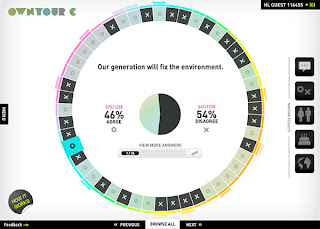
Own Your C
I found a pretty neat site for today...it's called Own Your C (the "C" stands for "choice" I'm guessing). You can choose to sign up for an account or stay completely anonymous, but once you visit the site you will be presented with a question asking you your opinion (agree or disagree) on a health topic. For instance, some of the statements I weighed in on were, "Chewing tobacco is no big deal." and "Using my cell phone while driving does not affect my performance." Once you answer agree or disagree, you can see the results of other peoples' answers displayed in an attention-grabbing layout. Then you can choose from different demographics (collected from only those who have signed up for a profile) to analyze the data in correlation to gender, age, etc.
I imagine that this would be a neat exercise to do with a health class or possibly a social class talking about current events. Each student could use their own computer or the teacher could present this on the whiteboard. Share any other ideas you may have for using this interesting site!
Subscribe to:
Posts (Atom)